Unified Data Storage for Manufacturing AI Explained
Unified data storage explained for manufacturing AI: architectures, trade-offs, tagging, and how to choose a pattern that reproduces results.
Written by AI for Manufacturing
Unified data storage is a single governed storage layer in which structured, semi-structured and unstructured data from plant systems is kept in open formats and made available to many analytics and AI tools without a separate copy for each one.
Table of Contents
- What Unified Data Storage Means for a Plant
- Warehouse, Lake, Lakehouse and Object Store Compared
- Why Plant Data Breaks in a Single Repository
- Centralized, Federated and Hybrid Storage Patterns
- Tagging, Taxonomy and Canonical Asset Models
- Partitioning and Layout Choices That Control Query Cost
- Reproducible Lineage and Choosing Your First Storage Pattern
What Unified Data Storage Means for a Plant
Unified data storage doesn't mean one physical server. It means shared access and shared governance, so an ERP order, an MES event and a vibration reading can be read from the same governed layer by BI, engineering and a model, each without building its own extract.
How the term arrived here
Data warehousing emerged in the 1980s to place structured analytical data in predefined schemas. Around 2010, the term data lake was introduced for large volumes of heterogeneous raw data, and from approximately 2015 onward cloud object stores replaced many Hadoop Distributed File System deployments, according to the history traced in the 2021 lakehouse paper from CIDR.
That paper describes the lakehouse as directly accessible storage supporting ACID transactions, data versioning, auditing, caching and query optimization. It's the step that matters for plants, because it adds warehouse rules to low-cost, open-format files.
- Structured sources: ERP, MES and quality systems.
- Semi-structured and unstructured sources: machine telemetry, images, logs and maintenance records.
Say a bearing temperature rises. Predictive maintenance needs that reading joined to the production order, speed, material and last service date. If each tool holds its own copy, those copies drift and your join stops being trustworthy.
That's why teams upgrading manufacturing systems using AI should fix storage governance before adding models, and why storage sits at the base of a practical AI tech stack for manufacturing.
Practical rule: If the same sensor value exists in three places with three different timestamps, your architecture isn't unified yet, whatever the vendor calls it.
Warehouse, Lake, Lakehouse and Object Store Compared
| Option | Schema approach | Data types it handles well | Transactions and governance | Typical plant use |
|---|---|---|---|---|
| Data warehouse | Schema on write | Structured tables from ERP and quality | Strong, curated | Monthly OEE and cost reporting |
| Data lake | Schema on read | Raw telemetry, images and logs | Weak by default | Keeping raw sensor history |
| Lakehouse | Open table format over files | Structured and semi-structured | ACID transactions and versioning | One governed copy shared by BI and AI |
| Object store | Files and objects only | Any format | Set by the layer above | Low-cost base for a lake or lakehouse |
How to read the table
A warehouse enforces schema on write. You decide columns, types and keys before data lands, so reporting is fast and consistent, but raw files and fast-changing telemetry fit badly.
A lake accepts raw files and applies schema on read. That's flexible for sensor streams and camera images, but governance is weak by default. Nobody can tell which copy is current unless you add that discipline yourself.
A lakehouse puts table rules over open files. BI gets curated tables, data science reads the same underlying files, and versioning lets you return to the exact data a model trained on.
An object store isn't a competitor to the other three. It's the low-cost physical base under a lake or lakehouse, and its governance comes entirely from the layer you put above it.
Matching the option to your first question
- Choose a warehouse when curated ERP, cost and OEE reporting dominate and the questions are known in advance.
- Choose a lake when raw telemetry and images dominate, retention is the goal and governance needs are light.
- Choose a lakehouse when BI and AI must read the same governed data and reproduce results later.
- Choose an object store as the base under either a lake or a lakehouse, not as the finished architecture.
You rarely pick only one. Historians and edge caches stay close to machines where latency and buffering matter, while the lakehouse holds shared history. Start with the question your plant needs answered first, because that question sets your default row.
For manufacturing AI, the lakehouse row carries the most weight. Predictive maintenance and quality models can train on the same governed copy your dashboards read, so features and labels can be reproduced months later when someone asks why a model scored a part as scrap.
Why Plant Data Breaks in a Single Repository
An IDC forecast in the 2020 Rethink Data report from Seagate projected enterprise data growth at 42.2% a year, and only 32% of data available to enterprises was reported as being put to work, leaving 68% unused. Volume alone doesn't explain that gap in a plant.
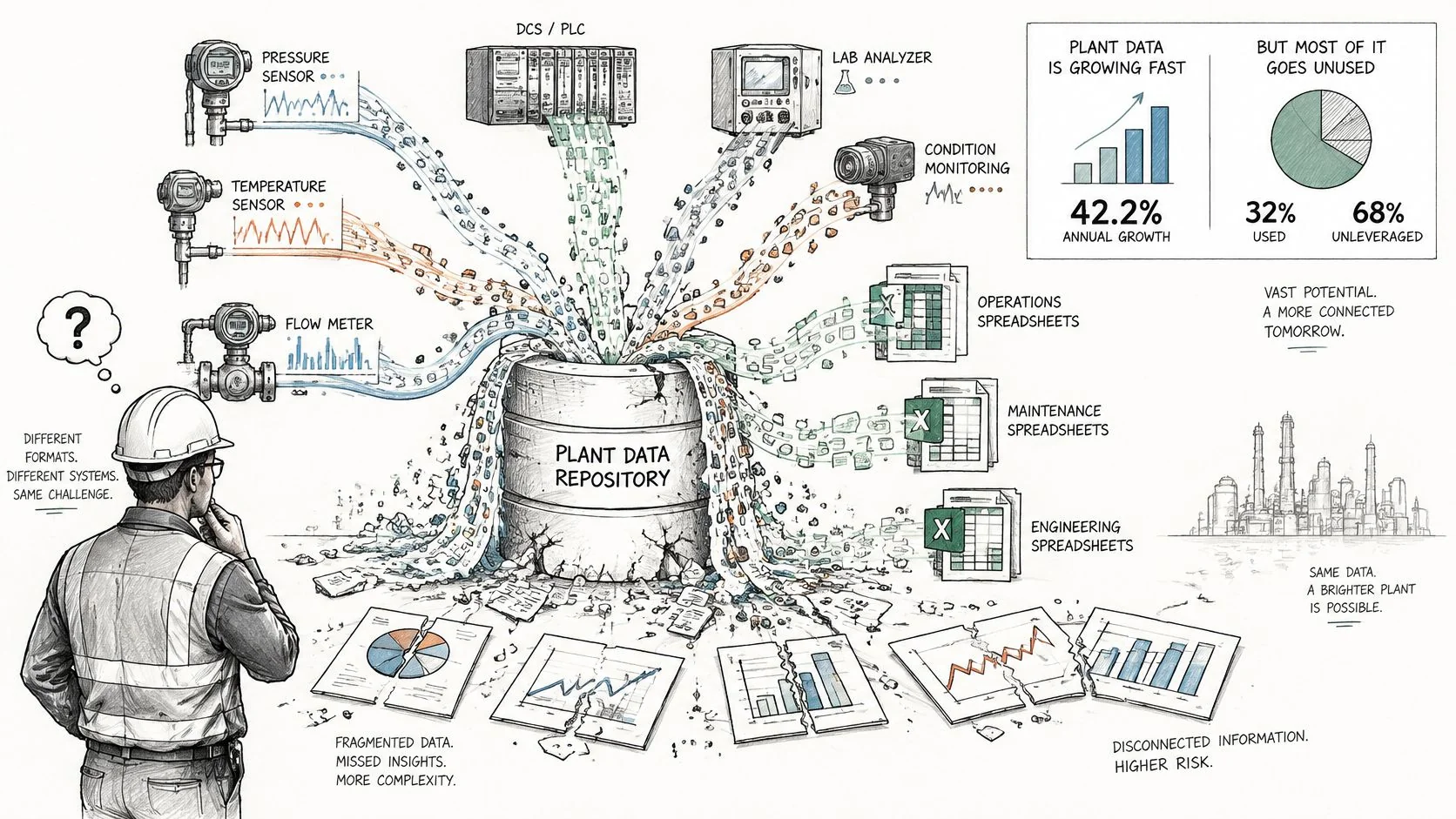
Plants add high-frequency sensor streams, machine-vision files, engineering documents and records spread across sites and cloud systems. Centralising files solves location. It doesn't solve meaning.
Where the same name stops meaning the same thing
A line can mean a production line in MES and a physical cell in SCADA. Timestamps arrive in local time from one PLC and UTC from a historian, pressure is psi in one system and bar in another, and production and quality define a batch differently.
Those mismatches live across ERP, MES, SCADA, PLC, historian, quality and maintenance systems. They're the same integration problem described for connecting ERP, warehouse, and CRM data, just with harder timing constraints. Solid manufacturing data collection practices catch them at capture, not after training.
A central store can hold perfectly stored, completely incompatible records.
Ask three questions of any candidate store:
- Asset identity: Can two systems report the same asset ID for the same machine?
- Time: Do every timestamp share one time zone and one clock source?
- Units: Is every unit recorded in metadata, not implied by a column name?
If any answer is no, a model trained on those joins can learn a variable whose meaning shifts between lines without warning. It'll look accurate in testing and fail in production, and you'll waste weeks blaming the algorithm.
Centralized, Federated and Hybrid Storage Patterns
| Pattern | Where data lives | Best when | Main risk |
|---|---|---|---|
| Centralized | One lakehouse holds copies of all plant sources | Plant is small or mid-size, latency tolerance is high, governance team exists | Replication lag and copy drift |
| Federated | Each plant or system keeps its store, queried through a shared catalog | Plants differ, data sovereignty or OT isolation applies | Cross-site joins are slow and semantics drift |
| Hybrid | Edge historian keeps high-frequency signals, lakehouse holds shared history | OT criticality is high and AI needs real-time and historical data | Two layers to govern |
A single repository isn't always right. Match the pattern to plant size, OT criticality, latency needs and governance burden before you compare platform brands.
Centralized is simplest to govern and cheapest to query across sources. Its weakness grows with source count, because every copy is a chance for lag and drift.
Federated leaves data where it is and queries through a shared catalog. That respects OT isolation and sovereignty limits, and product teams face a similar trade-off between local control and shared meaning, as NanoPIM on better shopping experiences illustrates for product data. In a plant, though, slow cross-site joins make large training sets painful.
Hybrid is what I'd choose for most high-criticality plants. Keep high-frequency signals at the edge for real-time use, publish governed history to the lakehouse for training, and accept the cost of governing two layers well.
Tagging, Taxonomy and Canonical Asset Models
Storage unification fails at the semantic layer first. You need a controlled vocabulary of tags, a taxonomy of assets, materials, processes and events, and stable identifiers that don't change when a system or machine is renamed.
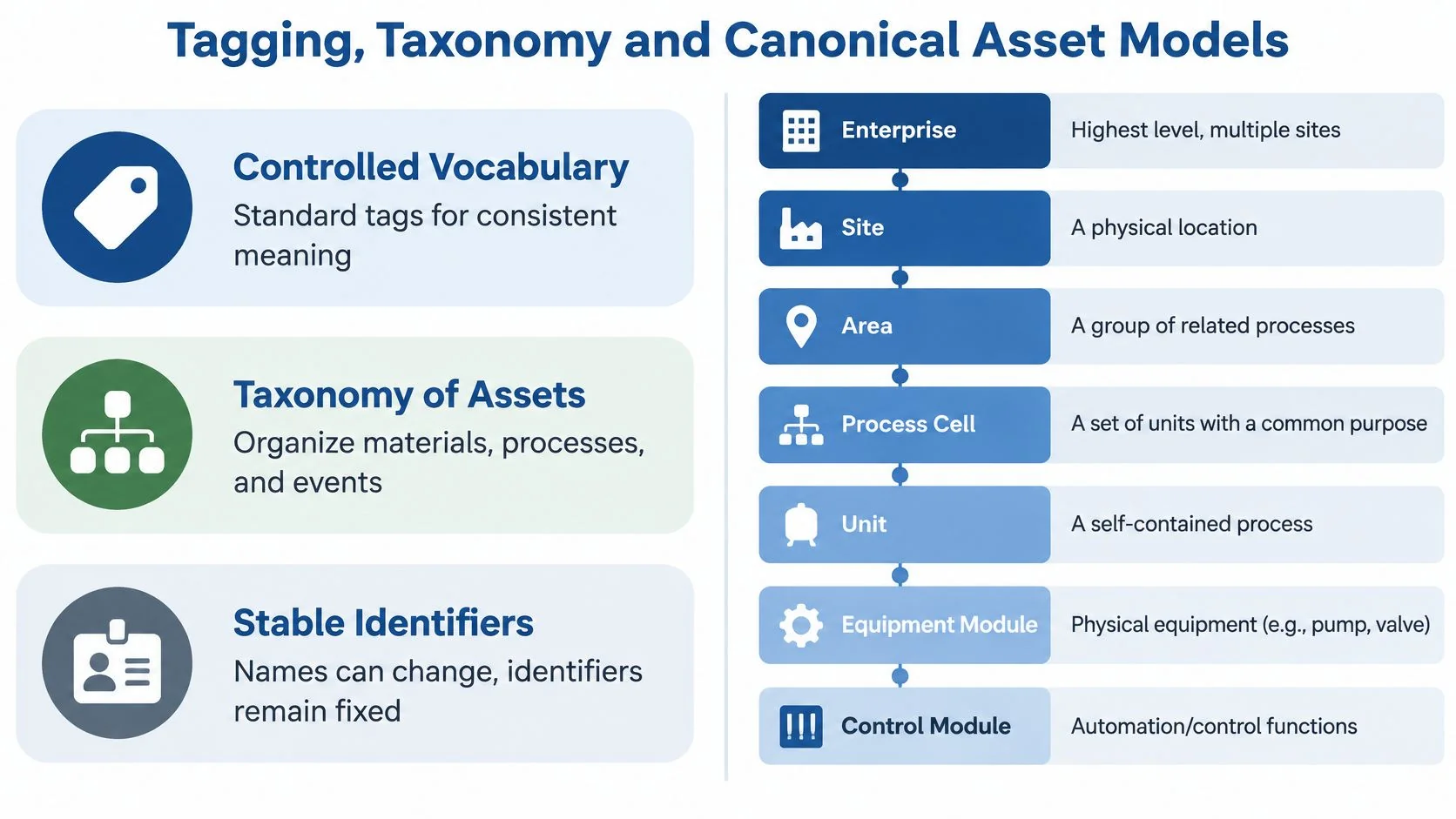
Use the hierarchy in the ISA-95 standards as your backbone: enterprise, site, area, line, cell and equipment. Apply one hard rule on top of it. Every sensor tag links to exactly one equipment ID.
Your canonical model also needs relationships, not just assets. Equipment, recipe, batch, material, operation, measurement and quality outcome must connect, or you can't tie process conditions to the parts they produced.
Five steps to a canonical model
- Inventory identifiers. List how each source names every asset, material and batch. You'll find duplicates immediately.
- Map to one canonical ID. Each source identifier resolves to a single governed ID, never to another source's ID.
- Store the mapping as governed data. Version it, own it and keep it queryable like any other table.
- Attach units and time zone to every tag. A value without both isn't model-ready.
- Record the mapping version with each dataset. That lets you trace a model back to the definitions it used.
NIST states in its manufacturing interoperability publication that standards for representing information are critical to transmitting data cost-effectively and without errors. Treat that as a requirement, not guidance.
Trade-off to accept: A detailed taxonomy speeds joins and model reuse, but it slows onboarding of a new line. A coarse one is quicker and hides real differences between machines.
Require three things from any platform before calling data model-ready: a documented schema, stable identifiers and machine-readable metadata. Without them, predictive maintenance and quality models depend on repeated manual mapping, and that cost returns on every line you add.
Partitioning and Layout Choices That Control Query Cost
| Query pattern | Partition or cluster key | Risk if the key is wrong |
|---|---|---|
| Last 24 hours of vibration for one asset | Event date, then asset ID | Date-only partitions scan every asset |
| Defects joined to the batches that produced them | Production order or batch ID | A missing batch key forces full scans |
| Monthly OEE for one plant | Event month, then plant | Daily partitions create many small files |
| Cross-site comparison of one product family | Product family, then event date | Mixed families weaken file pruning |
Why layout decides cost before a query runs
Open table formats store metadata that identifies which data files a query needs before execution. A good partition or cluster key lets the engine skip everything else, cutting object-store requests, network transfer and compute.
The Apache Iceberg performance documentation states that a single table can contain tens of petabytes, and that clustered-data bounds can eliminate unnecessary files and in some cases produce a 10x performance improvement. Read those as platform capabilities, not promises for your telemetry.
Partition by high-selectivity dimensions your queries filter on: event date, plant, asset, product family or production order. Column statistics then prune files inside those partitions.
The two failure modes
- Too many partitions: Metadata grows, files shrink and compaction becomes a permanent background cost.
- Too coarse partitions: Every query scans unrelated assets, so retrieving one machine's last day of vibration reads the whole plant.
Validate before you commit
- Take a representative week of telemetry, including a busy shift and a changeover.
- Run your three most frequent queries against two candidate layouts.
- Measure latency, write throughput, compaction cost and concurrent-reader behaviour, not just read speed.
- Keep the layout with the lower total cost, writes included.
This matters directly for AI. Training jobs repeatedly read the same window for the same assets, so a layout that ignores that pattern turns every retraining cycle into a slow, expensive full scan.
Reproducible Lineage and Choosing Your First Storage Pattern
The NIST manufacturing AI program describes four research threads: identifying real-world use cases and adoption barriers, developing metrics for human-AI teaming, creating methods to certify operator understanding of AI solutions, and validating AI-assisted systems through interoperability benchmark studies. Turn each into a storage requirement.
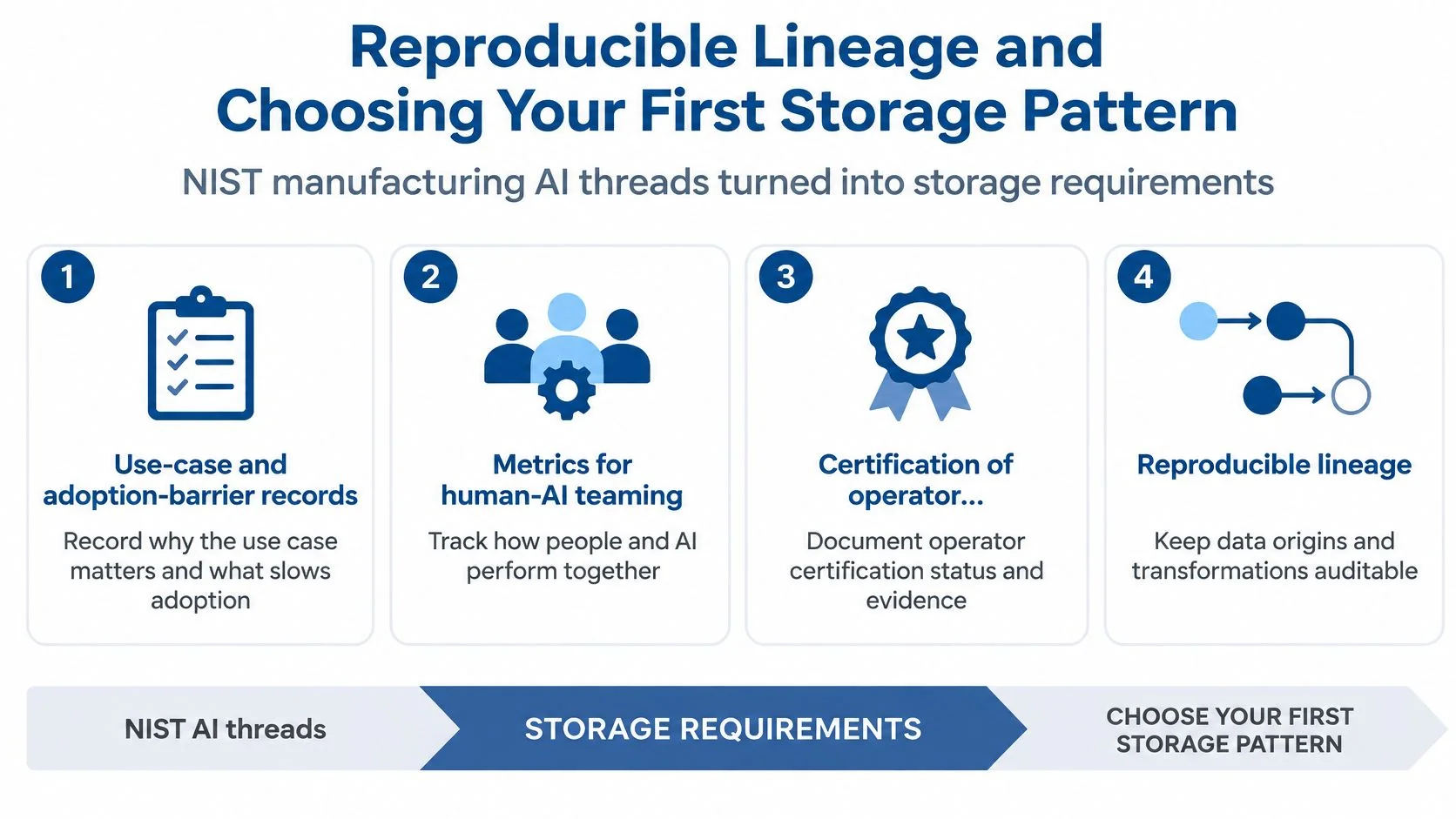
That means storing use-case and adoption-barrier records, human-AI teaming metrics, operator certification evidence and benchmark results alongside production data. If those records live in slide decks, you can't reproduce an evaluation.
What lineage must capture
Capture lineage from source equipment, through each transformation, to the model output. For every dataset and model keep searchable metadata covering source systems, owner, schema, units, time range, line context, transformations, training-data lineage, model version, intended use and validation status.
Operator-facing records need four more fields: model version, input window, confidence or uncertainty value and the action taken. With those, you can separate poor sensing, faulty transformation logic, model drift and low operator adoption instead of guessing.
A quality model trained on one product family must not run silently on another when materials, tooling or process windows differ. Metadata is what stops it.
Add access controls and retention rules so engineers can reproduce a result without unrestricted access to sensitive production or supplier data. Reproducibility and least-privilege access aren't in conflict if lineage records carry enough context.
Apply the same discipline when you evaluate vendors. In our directory, figures are as reported by each original source, whether a vendor case study, public filing or verified submission, and they aren't independently audited. All 415 records keep cited source URLs, so you can check the claim behind a number before you shortlist anyone.
Choosing your first pattern
- List two or three AI use cases to fund first, such as predictive maintenance, quality inspection or process optimization.
- Note the latency and data types each one needs.
- Pick centralized, federated or hybrid based on OT criticality and governance capacity.
- Run the semantic mapping and partition test on one line before scaling to the plant.
- Set lineage and metadata rules before the first model goes live, not after the first dispute.
Benchmark candidate vendors on the same metrics and the same representative data, then compare them on evidence rather than architecture diagrams. AI vendors can list their AI solution in the directory, where buyers compare vendors in the category, which gives you a starting set to test.
Your storage pattern decides whether your first manufacturing AI model can be trusted, reused and reproduced on the next line, whether that's predictive maintenance flagging a failing bearing, quality inspection catching defects earlier or process optimization holding a tighter window. Start this week by picking one line, mapping its asset IDs, units and timestamps to a canonical model, and running the partition test on a real week of telemetry before you sign any platform contract.
